Introduction
Your inventory is where you will find all the items you collect throughout your journey in the game. There are a great many items available, ranging from consumables that provide temporary benefits to permanent additions for your characters. Many items can be attached or applied to characters, while others are used for crafting or enhancing your den. Understanding how your inventory is organized will help you make the most of your collected items and ensure you can quickly find what you need for any activity.
To locate your inventory, click either the Home dropdown on the navbar and click Public Inventory, or navigate to your profile and click inventory under the User>Hoard dropdown. Condensed Inventory is for viewing everything you own at once and cannot be interacted with.
Please note that your inventory does not have a strict item limit, allowing you to collect as many items as you wish, however, this means that larger inventories may result in longer page loading times due to the number of images.
Item Categories
Your inventory is organized into seventeen categories, each serving specific purposes within the game. Items are automatically sorted into their appropriate category when acquired. If you do not own an item from the relevant category, the tab will not be available to you in your inventory.
Openables
Openables are items that reveal their contents when used. This category includes several types of items, each with different rewards and mechanics.
Types of Openables:
Standard openables provide items and currency when opened, making them straightforward rewards for your activities. Geno slot creators are special openables that generate a new character design slot when used, allowing you to create additional characters. Raffle tickets are openables that automatically enter you into current raffles when used, giving you chances to win exclusive prizes.
Packs represent a special subset of openables, such as Elemental Packs, Universe Packs, Holiday Packs, and Spirit Packs. These typically contain a specific number of items from certain categories and themed collections of items related to their specific type.
Gachas function differently from other openables. When you use a gacha, if you don't just recieve PT you will rarely receive vouchers that must be submitted through Admin Requests to claim your actual rewards. Similarly, many other vouchers you acquire (with the exception of tiered Familiar Vouchers purchased from Ares' Shop) also require manual redemption through Admin Requests. The item description will always indicate whether a voucher needs manual redemption, and will not show up in the openables category in the inventory.
How to Open/View Items:
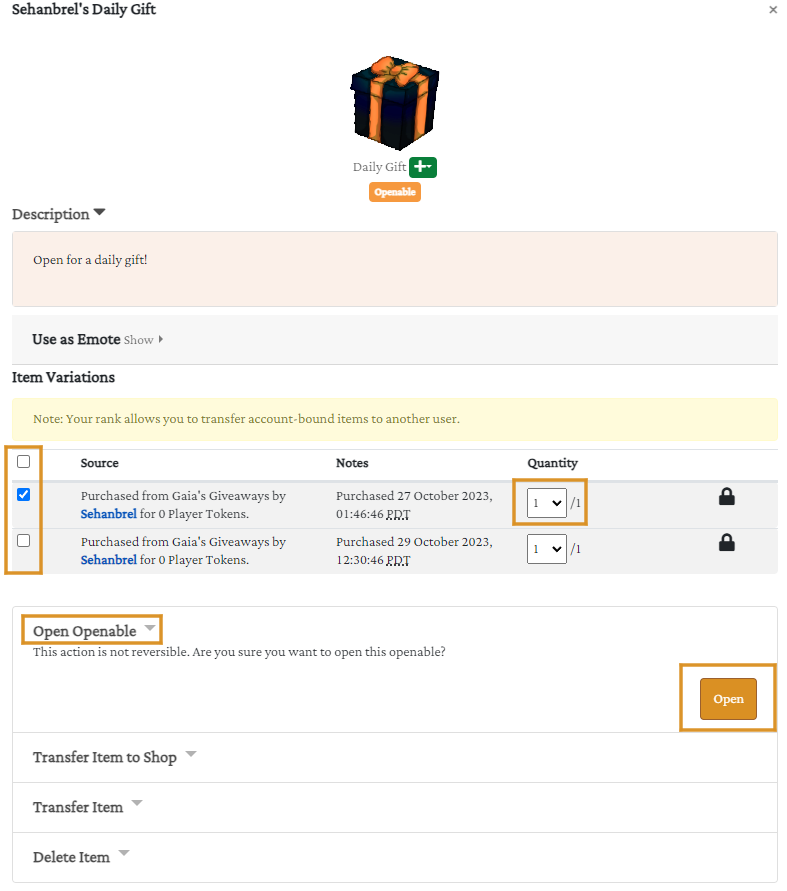
To open an openable, navigate to your public inventory and click on the item you wish to use. A popup window will appear showing the item details. Check the checkbox next to the item in this popup, then click either "Open" or "Use" depending on the openable type. The contents will appear in your inventory once processed. If you receive an error message, you likely forgot to check the checkbox before attempting to open the item.
If you have multiple of the item, you will have to check each checkbox you wish to open. Items with different sources and/or notes will be listed seperately, but if their source and notes match they will stack, so make sure to check the Quantity just in case if you're opening multiple.
If you have a lot of items in your inventory, this popup might take a moment to load as it has to wait till your inventory is fully loaded to load itself! If you have a larger inventory and it takes a while to load, you can always cancel loading the page - this will give image errors on each item that hasn't yet loaded, but will allow the popup to load immediately, a useful trick if you're just in there to open your openables.
Besides opening items, this popup is where you can view the item description and information related to it, transfer it to other players, or sell it. if you click on the item name under its image (Not the image itself), it will take you to the item's page itself.
You can also sell or donate the item from this popup in the same way as opening it. Selling it will give you PT, while Donating it will send it to the Donation Shop where other players can grab it if they desire for free. Openables cannot be sold or donated, you must open them first.
We discourage deleting any items, as most items in the game are sellable or donateable. If an item (besides openables) is not sellable, it is generally rarer and you could instead trade it to players or donate it instead of deleting it.
Once an item is opened, the page will reload and state at the top what you got out of the openable. The item stated will be in your inventory automatically. If you do not know what the item you got is, you can scroll down to your latest activity activity under your inventory to click on the item. You will be taken to the Compendium where it will give information on the item.
If there is nothing in the latest inventory activity besides opening the openable, it's because you recieved currency. You can find your currencies by heading to your Bank in a similar way as going to your inventory.
Crafting Materials
Crafting Materials are resources used exclusively in the crafting system. These materials cannot be used for any other purpose and serve as the basic building blocks for creating various items.
To use Crafting Materials, visit Krawft's Crafting, which is accessible at any time through the Activities dropdown in the navigation bar. Each crafting recipe requires specific materials in specific quantities, so check the crafting interface to see what you can create with your current materials.
You can learn more about crafting in the Crafting and Collections Guide here.
Special Crafting Materials
Special Crafting Materials function similarly to regular Crafting Materials but are significantly more difficult to obtain. These rare resources are typically only available during certain holidays, special events, in openables, or through specific game mechanics like enchanting. These materials are often required for crafting higher-tier or limited-edition items.
When it comes to Angel's Tears and Corrupted Tomes/Scrolls, you have to attach them and any other relevant item to an Admin Request to use them as the crafting recipes for them do not exist due to needing the notes manually filled in.
Make sure to check out Krawft's Crafting during holiday evens as he has special recipes available using holiday materials, including special crafting materials!
Specialty Items
Specialty Items are designed primarily for use in the design process or for player convenience rather than for direct submission or character applications. This category was renamed from "Unique Items" to avoid confusion with the Unique rarity tier.
You will find geno editing items here like Trait Edits, Reality Essence, and White Out, as well as Slimes for Slime Expeditions (If you've unlocked them). Unique Scrolls will also be found here as they differ from corrupted/purified scrolls and consumable scrolls.
The Specialty items category really is just for miscellaneous items that don't fit into any other categories and generally used by the player for their account or the characters they own.
Consumables - Submissions
Consumables - Submissions are single-use items that enhance your activity submissions. These items disappear after use and are attached to submissions in the Consumables section through the inventory dropdown when you're preparing your submission.
These consumables are designed to increase the rewards you receive from submissions, adjust the outcome of the roll, or provide other beneficial effects. For example, they might boost currency gains, increase item drop rates, or apply effects to enemies.
Multiple consumables can be used on one submission, however some items may not stack or might conflict, so be sure to double check what the consumable does and if it can even impact the activity you are submitting it for.
Consumables - Characters
Consumables - Characters are single-use items that apply directly to your characters rather than to submissions. Like submission consumables, these items disappear after use. You can use these on characters by submitting an Admin Request and attaching them in the consumables from the Inventory Dropdown.
These consumables provide advantages to your characters, such as stat increases, boosts, or straight up experiance. They cannot be applied during a submission, and we recommend using any items on your character before submitting them for an activity as we cannot promise the changes will be applied first.
Features
Features include physical trait applicators ranging from Common to Legendary rarity. These items allow you to add or modify physical characteristics of your characters, such as ears, manes, wings, tails, horns, and many other body modifications.
Features are applied to characters during the design process, either when creating a new character for Design Approval or when updating an existing character through a Design Update. When submitting your design, attach any Features you're applying from the inventory dropdown and clearly mention them in the comments section of your submission. If the character already has a feature in the slot the applicator takes, it will aesthetically overwrite it.
Applicators do not impact summons as they cannot pass, however Rebirthing can be impacted by them. There is a limit of 8 applicators you can use on a character (this includes Markings), however using a Scroll of Imprints can go over this cap.
Markings
Markings are similar to Features but specifically contain marking applicators ranging from Common to Legendary rarity. These items add visual patterns to your character's appearance rather than physical structural changes.
Like Features, Markings are applied during the design process and must be attached through the inventory dropdown during Design Approval or Design Update submissions. Always mention the markings you're applying in your submission comments.
Applying a marking applicator the character already has the marking of can be used as a way to have an Occult marking show if you have already hit the cap of Reality Essences to make said markings show.
Unique Traits
Unique Traits encompasses both physical body features and markings that are of Unique rarity. These are the rarest trait applications available and often provide distinctive appearances that stand out from others.
Unique Traits are applied using the same process as Features and Markings during the design phase. Include them in the inventory dropdown when submitting for Design Approval or Design Update, and mention them clearly in your submission comments.
Unique traits are special as they do not require a Glam Kit to make a custom version of. You can get Unique Traits from holiday shops, boss drops, or certain special events.
Mundane Equipment
Mundane Equipment consists of all regular equipment items without enchantments. These items may or may not have equipment slots revealed, but revealed slots alone do not count as enchantments. Mundane equipment provides no magical enhancements. They can however be used to enhance the character's design, but generally do not provide any bonuses in and of themselves when attached to a character.
Important: When attaching equipment to a character, do not use the inventory dropdown. Instead, list the equipment in the comments section using the detailed format outlined in the Familiars & Equipment Guide.
If you need the slots revealed on any equipment, please use the Equipment Appraisal Prompt. If you want to enchant your equipment, you can use our Enchanting Prompt, just note that enchanting costs PT.
Enchanted Equipment
Enchanted Equipment includes items that have enchantments applied to them. These enchantments can take various forms, including special effects like Burning, Magical Energy, or Farmer boosts, as well as direct stat modifications such as +5 Stamina or -4 Luck.
Like Mundane Equipment, attach Enchanted Equipment to characters by listing it in the comments section. Do not use the inventory dropdown for equipment.
[NEEDS CONTENT: Whether enchanted equipment can be further modified, maximum number of enchantments per item, slots, Purified and Corrupted]
Unique Equipment
Unique Equipment is specialty equipment pieces that are generally obtained from events, boss battles, holidays, or packs. These items often feature special and distinctive effects that cannot be found on standard equipment or added through regular enchanting.
Follow the same attachment process as other equipment types: list the Unique Equipment in your comments and not attaching it in the inventory dropdown.
[NEEDS CONTENT: Examples of unique equipment effects, whether unique equipment can be enchanted further]
Familiars
The Familiars category contains Common through Rare rarity familiars, which can be acquired through many aspects of gameplay including exploration, activities, crafting, and trading.
Familiars can be attached to either characters or Dens, providing various benefits depending on their type and where they're assigned. Like with Equipment, you can submit an Admin Request to have them attached, and you list them in the comments and do not attach them via the inventory dropdown.
Unlike equipment, please note that Ramiliars CANNOT be freely removed from the character and will require an Energy Siphon to be removed. Like with equipment, characters have a limited amount of familiars that can be attached. This limit also is dependant on their stats and is listed on their description.
[NEEDS CONTENT: How rarity affects familiar abilities]
Legendary Familiars
Legendary Familiars are exceptionally rare companions that can only be obtained through boss battles or special events.
Legendary Familiars typically have more powerful effects compared to Common through Rare familiars.
Like standard familiars, Legendary Familiars can be attached to characters or Dens.
Unique Familiars
Unique Familiars are exclusive companions obtained only through packs or specific boss battle events. These familiars often have distinctive appearances and special mechanics not available to other familiar types.
Attach Unique Familiars using the same process as other familiar types.
Den Items
Den Items are used exclusively to enhance and customize your Den. This category contains standard, non-special den items that provide various benefits or decorative options for your den space.
Den Items relate to Dens in the same way that equipment relates to characters, providing functional benefits and customization options. You can learn more about Dens here.
[NEEDS CONTENT: How to attach den items, examples of den item types and effects, maximum number of den items]
Special Den Items
Special Den Items are specialty items for your Den that are typically available only during specific holidays or events. These items often provide unique benefits or seasonal decorations not available through regular Den Items.
Like standard Den Items, Special Den Items are attached exclusively to Dens and cannot be used on characters.
Additional Resources
Text